
For people exploring online slots Canada, the quality of a site’s navigation can matter as much as the size of its game catalogue. Clear menus make it easier to move between slots, live tables, account tools and promotions without losing track of where you are. The lucky hills casino ca information available to Canadian readers points to a platform with several product areas, multiple account controls and browser-based mobile access. The practical question is not simply what is listed, but whether the layout helps you find the right section, understand its conditions and return to everyday tasks efficiently.
Start with the lobby structure, not the game count
A useful first step is to identify the main navigation areas before choosing a title. The service separates casino games, live casino, sports and esports into distinct sections, so users do not need to search through one undifferentiated catalogue. Within the casino area, the lobby includes video slots, classic-style slots, jackpot-labelled games, game shows and faster-paced formats. This separation is helpful for visitors who already know what type of entertainment they want.
Game labels can also shorten the search process. Lobby badges identify recently added, popular and jackpot games, while other markers distinguish titles that are eligible for bonus play or contribute towards bonus wagering. These labels should be treated as sorting aids rather than guarantees of quality or winning potential. A “popular” marker says something about presentation or player interest, not about likely results, return or suitability for a particular budget.
Players who prefer a supplier-led search have another route. The Providers page includes a name-search field and lists a broad range of software companies. Searching by provider can be more efficient than scrolling through every category, especially when a player recognizes a studio’s visual style or game format. However, the available library may vary by country, so a familiar supplier name does not mean every title will appear in the Canadian-facing lobby.
How can a player move from discovery to details?
Navigation works best when browsing and decision-making are treated as separate steps. Use the lobby to narrow the field, then open the individual game’s rules before committing funds. The available information indicates that game rules can be accessed within the games themselves. That is important because a lobby badge or short title may not explain the full mechanics, qualifying features, paytable, or any conditions connected with a special mode.
Promotional navigation needs particular care. The Bonus Wagering area groups titles that qualify for contribution, while some games may accept bonus funds without contributing to wagering and others may require cash funds. A player should therefore check the relevant promotion and the game’s classification together, rather than assuming that every casino title counts in the same way. This small check can prevent an unexpected change in progress after play begins.
Tournaments, lotteries and other event-based areas should be viewed as separate destinations rather than extensions of the ordinary lobby. Each has its own entry conditions, mechanics and prize rules, with participation beginning when the relevant event is selected. Keeping these areas distinct makes the site easier to understand: standard game discovery remains separate from optional competitions, and users can review the specific rules before joining instead of relying on general casino terms.
Keep account tools close to the browsing path
Good usability is not limited to finding games. Profile and Cashbox areas provide the operational controls that players may need during or after a session. Profile includes verification status, account settings, logout, password-related access routes and bonus information. Cashbox contains deposit and withdrawal functions, while Operations history records financial activity. Knowing these locations in advance reduces the risk of repeatedly searching through promotional pages for basic account tasks.
Verification is another area where clear navigation can save time. The available account structure places verification under Profile, where accepted documents and status information are shown. Identity or address evidence may be requested, and a payment method used for withdrawal may also need verification. If an activation message is missing, the account information indicates that support can resend or manually resolve it. Keeping registration details accurate is essential because failed checks or duplicate accounts can restrict access or withdrawals.
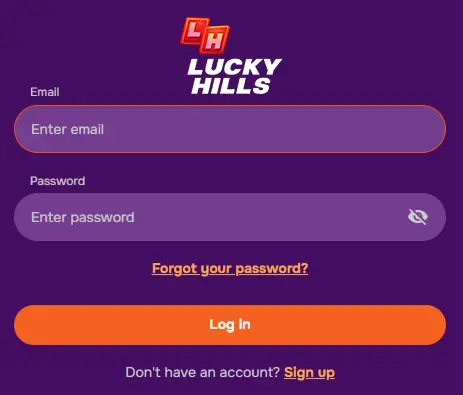
Password recovery begins from the login screen through the “Forgot your password?” option, with a reset link sent to the registered email address. If it does not appear, checking the spam folder is a sensible first response before contacting support. For broader account-security guidance, readers can consult the Canadian Centre for Cyber Security’s online safety resources. The general principle is simple: use unique credentials, sign out on shared devices and avoid entering account details through unverified messages.
What changes when the screen becomes smaller?
Mobile navigation should be judged by whether the essential destinations remain available, not by whether it copies the desktop layout exactly. The listed browser experience supports smartphones and tablets, including casino games, live tables, sportsbook navigation, Cashbox, account settings and promotional pages. This means a user can access the principal areas without needing a separately verified native mobile application.
The site also displays an Install app entry and describes a PWA installation route. Based on the available information, this refers to an installable website or web-app experience; a separate application verified through Apple’s App Store or Google Play is not established. That distinction matters because users should know whether they are adding a browser shortcut or downloading a native program. Checking the installation prompt and the device’s permissions before proceeding is a sensible precaution.
Small screens make filtering and backtracking more important. A player can begin with a broad slot category, use visible badges or provider search to narrow the choices, and then return to the lobby rather than opening several unrelated pages. Account and payment actions deserve extra attention on mobile because buttons may be condensed and confirmation details easier to overlook. Review the selected section, amount and account status before submitting any consequential request.
Use a simple route for everyday sessions
A consistent navigation routine can make a multi-section platform feel less complicated. Begin by deciding whether the purpose is game discovery, live play, account maintenance or reviewing a promotion. Enter only the relevant section, and avoid treating sports, esports, tournaments and casino browsing as one continuous activity. A narrower route helps maintain a clear record of what you intended to do and reduces accidental movement into unrelated offers.
For game discovery, a practical sequence is: choose the casino area, select a broad category, apply a provider or lobby label if useful, open the game rules and then return to the lobby before selecting another title. For an account task, go directly to Profile or Cashbox. This approach is more reliable than using promotional banners as the main menu because banners may highlight campaigns while hiding the location of ordinary settings.
Before finishing, check the relevant history and status pages. Profile can show bonus states such as available, active or in line, while Cashbox contains transaction records. Logging out is available from Profile, which is particularly useful after using a shared device. If a navigation problem, verification issue or payment question remains unresolved, the listed live chat and email support channels are the appropriate route rather than repeated attempts with incomplete information.
Questions Canadian users often ask
Can I search for a game by provider?
Yes. The Providers page includes a name-search field, allowing users to look for a software supplier instead of scrolling through the full lobby. The resulting catalogue may depend on location, so a provider search should be treated as a way to narrow discovery, not as a guarantee that every associated title is available.
Where are bonuses and wagering categories shown?
Bonus information is available through Profile, where offers can appear as available, active or in line. The Bonus Wagering area groups titles that contribute towards applicable requirements. Because some games accept bonus funds without contributing, read the specific promotion and title classification before starting play.
Is mobile access a native app?
The available information confirms browser access on smartphones and tablets and describes a PWA installation route. It does not establish a separately verified native iOS or Android application. Users should therefore distinguish an installable web shortcut from a store-distributed app and review the device prompt before accepting any installation.